Menu
Menu

Problem
Problem
Problem
Problem
Process
Process
Process
Process
Research
Research
Research
Research
Method
Method
Method
Method
Solution
Solution
Solution
Solution
Impact
Impact
Impact
Impact
Creators Can’t Trust What They’re About to Publish
UNUM is a social media planning app that helps social content creators plan and preview posts before publishing.
But planning breaks down the moment that matters most. Creators often spend hours curating layouts only to discover after publishing that posts don’t look the way they expected.
This uncertainty breaks creative flow and forces creators into time-consuming cycles of deleting, re-editing, and reposting content.
Instead of publishing with confidence, creators hesitate, delay, or reactively repair their work after the fact.
My goal was to design a way for creators to accurately preview content, protect curated layouts, and confidently commit to publishing without second-guessing.
Intro
You’ve just spent hours curating the perfect post. You ask ChatGPT for caption ideas, you edit the content until your eyes hurt, you line it all up so your feed tells the story you want. And then, you finally hit publish.
Hooray! Mission accomplished, right? Not so fast.
The post you just published doesn’t look like what you expected, and you’re only noticing it now that it’s live. Or the UI of the social app is covering the exact part of the image your followers need to see. Or suddenly your grid looks completely off.And just like that, you’re
deleting, re-editing, reposting. Time to start... all... over... again. Ugh.
I’ve been there.
I’ve been a photographer most of my life, and showcasing my work visually has always been important to me. For years I used UNUM to keep myself somewhat organized. It helped, but there were plenty of moments where I was flying blind. What I saw in the app wasn’t always what my audience saw once it went live. And that gap? That’s exactly the kind of thing that breaks creative flow — and can be so discouraging.
So I turned it into a design challenge: how can UNUM actually keep creators in their flow instead of forcing them to stop, rearrange, and repair?
And that’s where the real problems started to come into focus.
A Diverge to Converge Process to Move From Uncertainty to Confidence
I approached this project by deliberately separating exploration from decision-making.
I started wide by examining how creators actually plan and publish content today, including where confidence breaks and why fixes usually happen after posts go live.
Once those patterns were clear, I narrowed the problem down to a single question: how might UNUM help creators trust what they see before they publish?
From there, I expanded again to explore multiple ways that preview accuracy and layout protection could be introduced without slowing creators down, and finally converged through iterative testing to refine what actually reduced hesitation in practice.
This process allowed me to move from a vague sense of frustration to a focused, testable solution grounded in real planning behavior.
Problem
To figure it out, I talked to five creators — photographers, designers, content managers — and asked them to show me their process. One said, “If I don’t feel confident about how it looks, I just delay posting it.” Another laughed and called the grid a “house of cards. Delete or archive one post and the whole thing collapses.”
A content creator pointed out something I hadn’t realized before: Instagram grids don’t even look the same for everyone. Depending on your phone or account, the squares render differently — which means your feed might look one way to you and a different way to your audience. She wanted a way to preview it all — grid view, post view, different screens — before pressing publish.
At the same time, I looked at UNUM’s competitors. None of them were addressing these core frustrations. Not Canva, not Preview, not Planoly. None offered a way to keep images grouped together for easy access. None matched Instagram’s actual grid perfectly. None gave creators a reliable way to know what a post would really look like before it went live.
The more I listened and compared, the clearer it became: this wasn’t just a small annoyance, it was a trust problem. And trust was the thread I needed to pull on in the process ahead.
Research Revealed That the Core Issue Was Trust, Not Aesthetics
I interviewed five social content creators whose work depends on maintaining a consistent visual presence, including photographers managing curated grids, designers publishing branded content, and content managers responsible for regular posting schedules.
Each participant walked me through their real planning and publishing workflow. Across roles, the same friction surfaced: creators hesitated to publish when they couldn’t trust how their content would appear once live.
They described their grids as fragile systems where a single change could undo hours of planning, and several pointed out that Instagram renders layouts differently across devices and accounts, making preview tools unreliable.
If Creators Can Trust What They See, They’ll Publish With Confidence
Based on these insights, I formed the hypothesis that if creators could preview their content exactly as it would appear live and protect curated layouts while planning, they would feel more confident publishing and reduce hesitation, rework, and post-publish fixes.
This reframed the challenge from adding functionality to designing guardrails that support the creator’s happy path.
Process
I gathered everything from my interviews into an affinity map. It was sticky notes everywhere — in my head and in FigJam — but patterns started popping out. From that came two personas: the curated creator, who cares about pixel-perfect storytelling, and the conversion creator, who prioritizes consistency and growth over aesthetics. Both had the same underlying need: trust. They wanted to feel confident that the tool they were using wouldn’t betray them when it was time to hit “post.”
The Aha Moment: It Was Never About More Features
That’s when it hit me: my original assumptions were wrong. This wasn’t just about adding another feature. What they wanted was confidence. And confidence is built by understanding the creator’s happy path. Using FigJam, I mapped out user flows to see how someone could move through the app without friction. But then I asked myself: what would this feel like for a real human, in our messy three-dimensional world?
Flat Sketches, Real-World Flow
First, I started flat — sketching ideas in two dimensions.Alocking feature to keep posts grouped together. Pixel-accurate previews that matched Instagram exactly. Safe zones that adapted automatically so nothing got lost under icons.Adraft vault to protect curated grids, even if the app crashed. Then I imagined how it would feel in real life — scrolling quickly, planning, moving fast. The goal wasn’t just new features for the sake of it. It was to build guardrails that would protect their flow.
But sketches and flows can only go so far. The next step was to put these ideas into the hands of creators.
Validating Behavior, Not Features
To test the hypothesis, I shifted away from feature exploration and toward validating real planning behavior. I distilled research into two lightweight personas, then intentionally designed around what they shared rather than where they differed. That common ground revealed a critical moment: the point just before publishing, where confidence either holds or collapses.
I mapped the creator’s happy path to understand how planning, previewing, and committing to a post should feel when everything is working. These flows exposed where hesitation crept in, where layouts became fragile, and where creators needed guardrails to preserve momentum.
I explored solutions through sketching and low-fidelity wireframes to test ideas quickly without committing to interface detail. Using lightweight prototypes, I evaluated whether concepts like layout locking and accurate previews reduced second-guessing in practice.
Only the ideas that measurably increased confidence progressed into higher-fidelity execution.
Solution
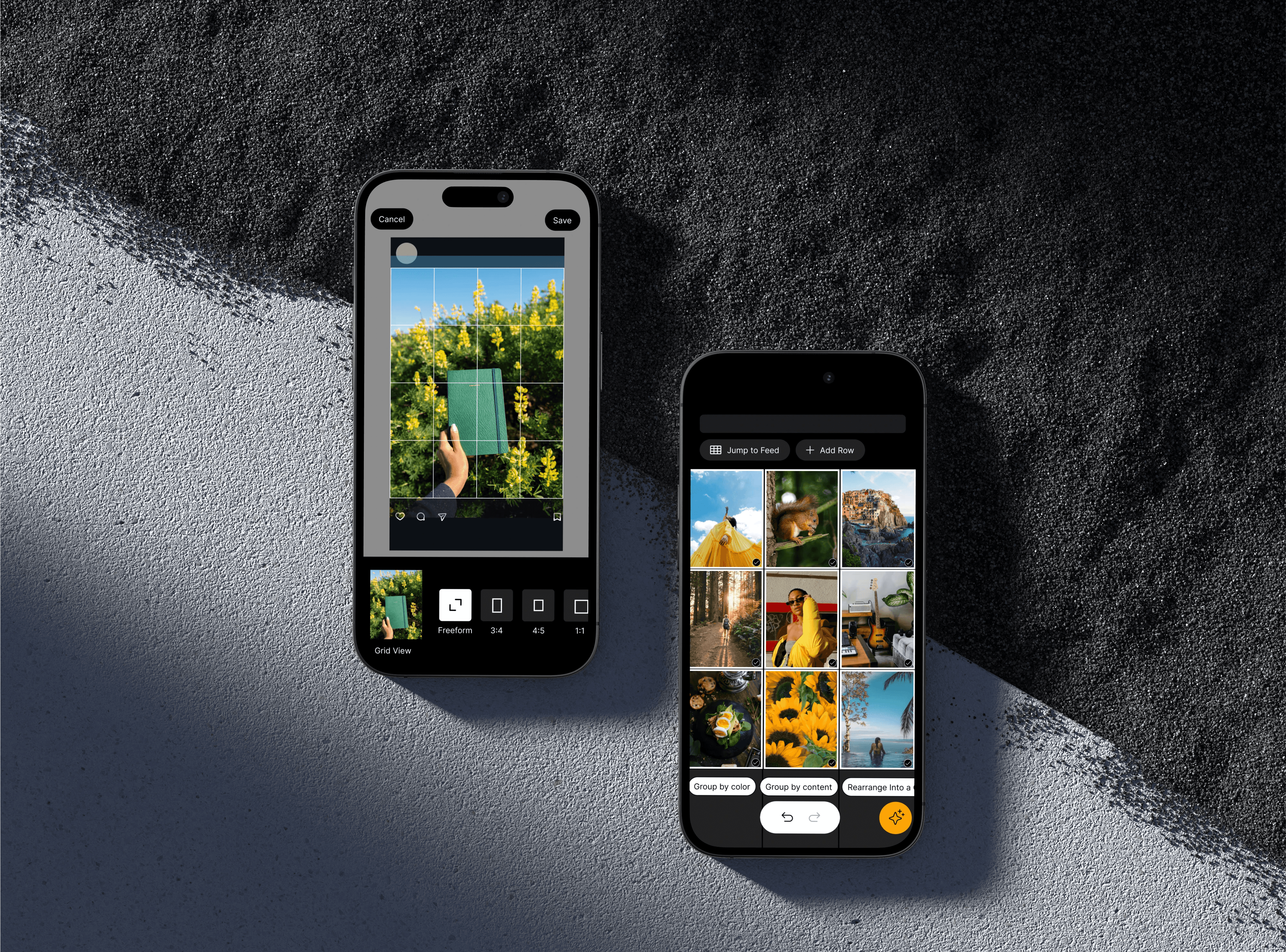
I built high-fidelity wireframes and brought them back to the same users. When they saw the lock feature, the feedback was immediate. One smiled and said, “This is great. I can save my edits together, and when I’m ready to post, I’ll know they’re safe.” That told me I was onto something. But of course, it wasn’t perfect. Four out of five were frustrated by the multiple lock buttons — they wanted one simple action. TheAI suggestions sparked curiosity, but everyone wanted a shuffle option so they could see multiple variations instead of just one.And more than one person was confused about theAI Drafts button because it looked too much like the general AI button.
So I refined. I simplified the locking into one clear action. I gave theAI button its own distinct color so it stood out. I added shuffle options so layouts could be rearranged by color or by content.And I redesigned the button for draft suggestions — switching it to a folder icon, pairing it with a sparkle, and adding clearer text so users could tell it was powered byAI. I also updated the preview overlay so creators could see both the single post view and the grid view across devices — just like Instagram actually displays it.
These changes set me up for another round of testing — and that’s where I saw the real impact.
Preview Accuracy With Layout Protection
I translated the concepts into high-fidelity wireframes and tested them with the same creators across three iterations. Early testing confirmed that layout locking immediately resonated, as creators felt more confident knowing curated posts would stay grouped until publishing.
Testing also revealed friction: multiple lock controls caused confusion, AI suggestions felt too limited without variation, and draft actions were unclear due to visual similarity with other AI features.
I refined the solution by consolidating locking into a single clear action, introducing shuffle options for faster layout exploration, and clarifying AI entry points through distinct visual cues and labeling. I also expanded the preview experience to show both grid and single-post views across devices, aligning the planning experience with how content actually appears on Instagram.
These iterations reduced hesitation before publishing and shifted the experience from reactive fixes to confident decision-making.
Impact
Testing the iterated version, the feedback was mixed but promising. The good: creators loved the single lock button, the new preview overlay, and the ability to shuffle layouts withAI. The bad: the draft suggestion button still wasn’t intuitive. Users were so used to manually pulling in content that they didn’t immediately see the value of lettingAI do it for them. One content manager told me, “If it has a sparkle icon, I’ll know it’s AI.” Another said, “I need to see a photo option next to it — otherwise I’ll just assume it’s for adding new content.”
Armed with that feedback, I created my most updated version: multiple image selection with a drag gesture, an AI draft button with both a sparkle and a short explanation, and improved labeling across the AI options to reduce second-guessing. Which brings me to the biggest lesson of all.
Confidence Replaced Hesitation Before Publishing
After testing the final iteration, four out of five creators said they were excited to start using the new flow and felt ready to post with it immediately. These creators also mentioned the flow fit naturally into their existing workflow and would reduce their posting process from hours to minutes.
In the third round of testing, the feedback shifted from identifying usability issues to identifying opportunities for growth. The creators suggested additional enhancements and talked about extending the system to support other parts of their creative process.
This shift indicated that the core problem (uncertainty before publishing) had been addressed, allowing future iterations to focus on expansion rather than repair.
Reflection
Looking back, this project taught me something I’ll carry into every design: creative confidence matters just as much as creative tools. Because if creators trust what they see, they don’t have to second-guess. They can stay in their flow and focus on telling their story — and that’s the whole point.